TextCaster Dashboard

Log-in
A. Accepting a User Invite
B. For Users with existing credentials
C. Accessing Multiple TextCaster Customers with a Single User Account

Navigation

Navigation Bar Features
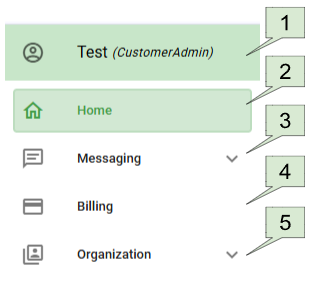
1) Personal Settings
Your name (User role)
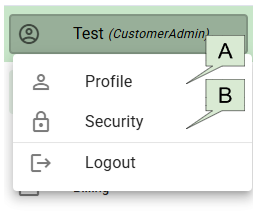
A. Profile
I. Email / User Name
II. Mobile Phone
III. Land Line
B. Security
I. Change Password
II. Two Factor Authentication

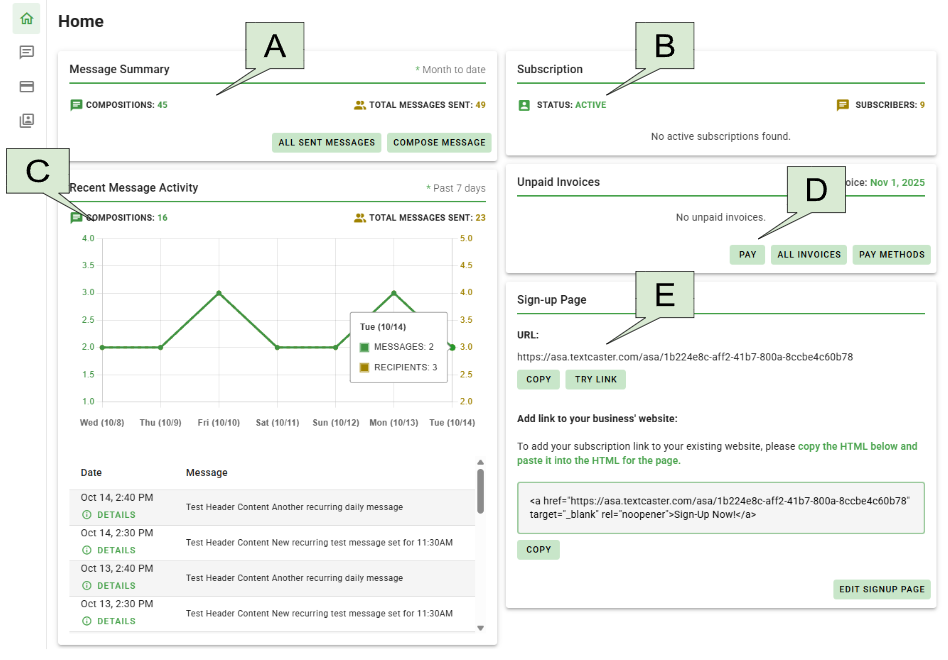
2) Home
A. Message Summary
B. Subscription
C. Recent Message Activity
D. Unpaid Invoices
E. Sign-up Page

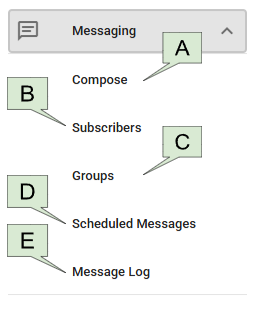
3) Messaging
A. Compose
I. Recipients
II. Schedule Message
III. Compose Text
IV. Compose Email (if available)
V. Preview and send
B. Subscribers
I. Active
II. Pending
III. Unconfirmed
C. Groups
I. Group Types
II. Add Groups
III. Edit Groups
IV. Categories (Optional)
D. Scheduled Messages
I. One-Time Scheduled Messages
II. Recurring Scheduled Messages
E. Message Log
I. Filter View
II. Sent by
III. Details

4) Billing
A. Pay Invoices
I. Pay Selected Invoices
II. Pay Balance
B. All Invoices
I. Invoice Due
II. Status
III. Items
IV. Actions
C. Payment Settings
I. Enable Automatic Payments
II. Add Saved Payment Method

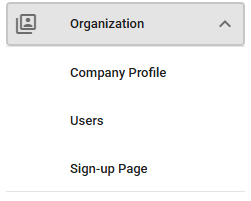
5) Organization
A. Company Profile
I. User
II. Person
III. Organizational Contact
IV. Billing
V. Legal
B. Users
I. Users
II. Invites
C. Sign-up Page
I. Share
II. Add Sign-up Link to Your Business' Website
III. Change Header Image
IV. Delete Header Image
V. Change the header Content of your Sign-up page.

Multi-Segment Messages

F.A.Q.s

User Role Permissions Matrix