¶ Organization
¶ Manage your organization's profile and settings.
¶ A. Company Profile
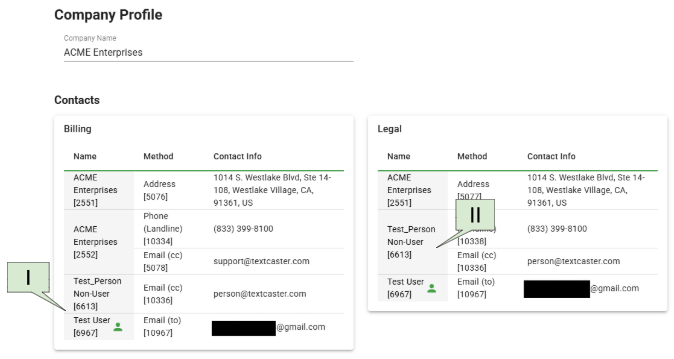
- Each Organization can have up to three different types of contacts:
- User
- Person
- Organizational Contact
¶ I. User
- An individual with an existing TextCaster profile, identified by a person icon. A user can have one of each of the following contact methods:
- Email (@gmail.com)
- Mobile Phone - Phone (Mobile)
- Landline Phone - Phone (Landline)
¶ II. Person
- Represents an individual not registered as a user in TextCaster, identifiable by the absence of a person icon. A person can have one of each of the following contact methods:
- Email (person@textcaster.com)
- Mobile Phone - Phone (Mobile)
- Landline Phone - Phone (Landline)
¶ III. Organizational Contact
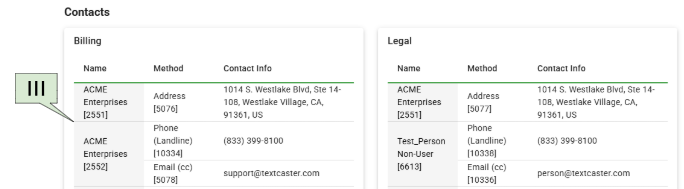
- This contact information is not linked to a specific person's profile but rather the organization at large. It's best suited for a group mailbox or a general company phone line.
- Organization Contact
- Identified by including the company's name.
- An Organizational Contact can include one of each;
- Address
- e.g. 1014 S. Westlake Blvd. Ste 14-108, Westlake Village, CA, 91361, US
- Email
- e.g. support@textcaster.com
- Landline phone
- e.g. (833) 399-8100
- Address
- Organization Contact
¶ IV. Billing
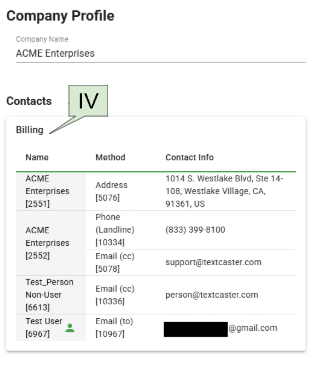
- The Billing Contact is crucial for all communications related to invoicing and payments.
- Address
- The mailing address of the organization.
- Email (To)
- The email address may be a User’s email address (@gmail.com) or an email address of the organizational contact such as “support@textcaster.com”.
- Phone
- The phone may be the landline or mobile of a User or a landline of the organizational contact. I.e. (833) 399-8100.
- Email (CC) Optional field
- The email address may be that of a Person I.e. “person@textcaster.com”, a User, or Organization.
- Edit
- If changes need to be made, please contact support at 833-399-8100 or “Support@textcaster.com”
- Address
¶ V. Legal
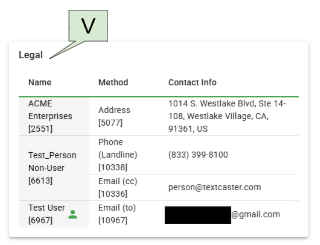
- The Legal Contact is the organization and the individual whose information we submit to the Cell Carriers for verification.
- Address
- A mailing address for the organizational contact.
- Email (To)
- The email address of a User (@gmail.com) or a Person. I.e. “person@textcaster.com”
- Email (CC) Optional field
- The email address may be that of a Person I.e. “person@textcaster.com”, a User, or Organization.
- Phone
- The phone may be the landline or mobile of a User (I.e. “(833) 399-8100”), or the mobile or landline of a person, or the landline of the organizational contact. I.e. “1-800-GoFedEx”.
- Edit
- If changes need to be made, please contact support at 833-399-8100 or “Support@textcaster.com”
- Address
¶ B. Users
|
Every individual who needs to compose and send messages must have their own User account and Password. Customer Administrators are able to invite users and assign them roles with different access levels within the TextCaster dashboard. |
¶ I. Users

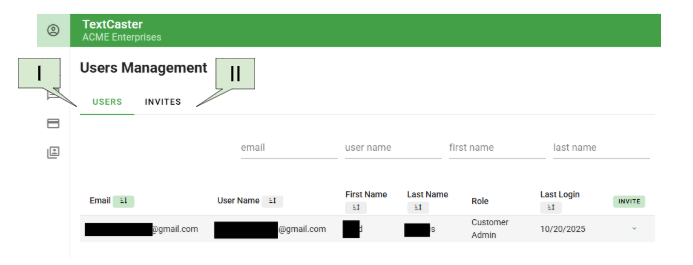
- Users are other individuals who can access your organization’s TextCaster Dashboard.
- a. Email
- Email address of the User (sortable by alphabet, ascending or descending)
- b. User Name
- The User's Username which is entered to log-in. This can be an email address or not. It may not match the User's email address. (sortable by alphabet, ascending or descending)
- c. First Name and Last Name
- The Users First and Last names in separate columns. (both sortable by alphabet, ascending or descending)
- d. Role
- Customer Administrator
- Full access to the TextCaster dashboard.
- Billing Administrator
- Access to Billing Overview, Statements and Payments, and Payment Settings. This role does not include access to sending messages.
- Message Administrator
- Limited access to sending messages to specific Message Categories as assigned.
- Message Viewer
- View-only access to the message log.
- Customer Administrator
- a. Email
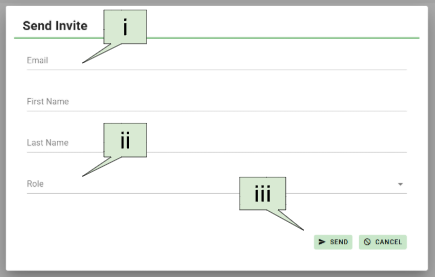
- e. Invite
- Invite new users.
- i . Email
- Email address to assign to the User and also to send the invitation to.
- ii. Role
- Role of the User once registered.
- Customer Administrator
- Full access to the TextCaster dashboard.
- Billing Administrator
- Access to Billing Overview, Statements and Payments, and Payment Settings. This role does not include access to sending messages.
- Message Administrator
- Limited access to specific Message groups as assigned.
- Message Viewer
- View-only access to the message log.
- API Admin
- A role for customers using the TextCaster Connect product. Allows for creating and managing API Keys and Webhooks and their related functions.
- Customer Administrator
- Role of the User once registered.
- iii. Send
- The individual will receive an email invitation for the assigned role. After confirming their email address, the User can then register their User account.
- i . Email
- Invite new users.
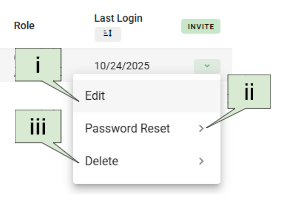
- f. Actions
- i. Edit
- Use the Edit feature to modify the User account details. You can change the user's role, first name, last name, and email address.
- Note: The username cannot be changed.
- If you change the email address, an email confirmation will be sent to the user's new address. The updated email will be reflected in User Management only after the user logs in and confirms the change.
- ii. Password Reset
- You can send a password reset email to the user on their behalf. This email will be sent to the current email address listed on the User account.
- iii. Delete
- This action will permanently delete the user account.
- i. Edit
¶ II. Invites
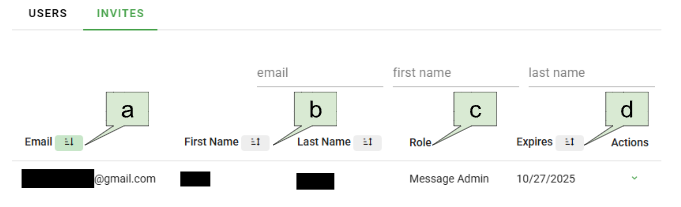
- View a list of individuals who have been invited to register as Users for the customer but have not yet completed the registration process via the email invitation.
- a. Email
- Email address assigned to the Users. NOTE: For all users invited using the Dashboard, the User's email address will also serve as their username for logging into TextCaster.
- b. First Name and Last Name
- The Users First and Last names in separate columns. (both sortable by alphabet, ascending or descending)
- c. Role
- Role of the User once registered.
- d. Expires
- When the invitation will no longer be valid.
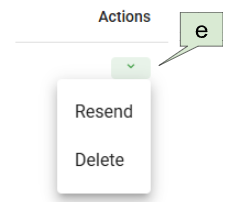
- e. Actions
- Resend
- Sends the invitation to the individual again.
- Delete
- Removes the invitation, preventing the individual from registering via the emailed link.
- Resend
- a. Email
¶ C. Sign-up Page
- This section allows you quick access to your Sign-up Page - formerly called the ASA.
¶ I. Share
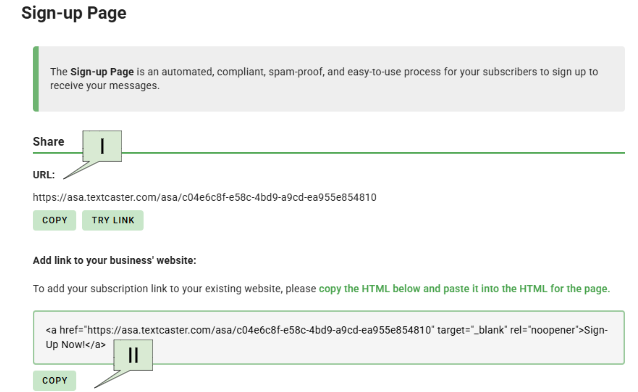
- URL
- Copy
- Click to copy the URL to your clipboard to easily add it to your email or other publications
- Try Link
- You can view your sign-up page by clicking the "Try Link" within this section.
- Copy
¶ II. Add Sign-up Link to Your Business’ Website
- Copy
- Click to copy the HTML to paste into your website.
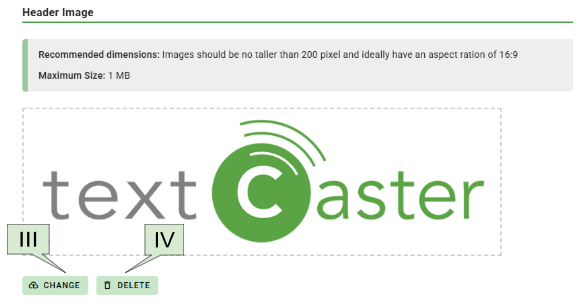
¶ III. Change Header Image
- Click to change your logo image on the top of the Sign-Up Page.
¶ IV. Delete Header Image
- Click to delete your logo image on the top of the Sign-Up Page.
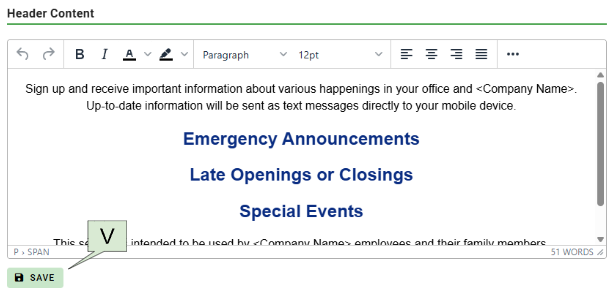
¶ V. Change the header Content of your Sign-up page.
- Use the WYSIWYG (What you see is what you get) editor to display your desired message in the header of your Sign-up Page.
- Save change you made.
- Use the “Try Link” mentioned in Organization - Sign-up Page - Share to preview how your edits will appear to your subscribers.